How to Run SaaS Regression Tests Without Writing Scripts
No-code regression testing for SaaS apps lets a team define and repeat browser workflows without maintaining a test script for each one. The work still needs clear requirements, valid accounts, prepared data, and someone who reviews failures.
The best starting point is a repeated manual check with an observable result: a member creates a project and reopens it, an admin invites a teammate, or a paid user accesses an entitled feature. Choose one journey, make its pass condition explicit, and verify that the automated result is useful before expanding coverage.
Choose a workflow that belongs in a browser
Start with a task that crosses several parts of the product and matters to a customer. Saving a project connects the interface, authentication, backend, and persistence. That makes it a useful browser-level candidate.
Detailed pricing calculations, exhaustive form-rule combinations, and backend authorization enforcement often deserve checks closer to their implementation. A no-code browser suite can complement those checks without taking responsibility for all of them.
Use this selection table to scope the first cases:
| Candidate | Useful starting point when | Setup to resolve first |
|---|---|---|
| Create and reopen a record | Saving the record is a core customer task | A scoped account, unique record name, and cleanup process |
| Search a known dataset | Finding records is essential to daily use | A small fixture with exact expected matches |
| Restricted admin workflow | Roles change what users may do | Separate role accounts and an approved permission rule |
| Subscription entitlement | Paid access is release-critical | A billing sandbox and a prepared subscription state |
| Signup | New-user conversion is in scope | Fresh identities, verification access, and account cleanup |
For a broader coverage map, start with the SaaS regression testing checklist.
Translate a manual check into actions and outcomes
“Check project creation” leaves too much interpretation to the runner. A useful case says who acts, where they act, what they enter, and what result must remain true.
Here is an illustrative specification for a workspace app:
Preconditions: a member can create projects in the staging workspace; an unused project name is reserved; disposable records are permitted.
| Action | Expected result |
|---|---|
| Open the project list in the staging workspace | The active workspace is identifiable and the list is usable |
| Create a project with the reserved name | A project detail page shows the entered name in that workspace |
| Reload the page | The saved name remains present |
| Return to the list and find the project | The intended saved record is discoverable |
| Open it again | The detail page shows the same persisted values |
The reload and return visit make persistence part of the pass condition. An agent should not replace those checks with a success toast or stop after the form closes.
Keep expected results independent from a particular button position. “The project remains available after reload” is a product requirement. “Click the second blue button” is fragile navigation detail unless the button order itself is what you need to test.
Use a review loop for generated cases
Natural-language tools can suggest coverage, but suggestions need review before they become release evidence.
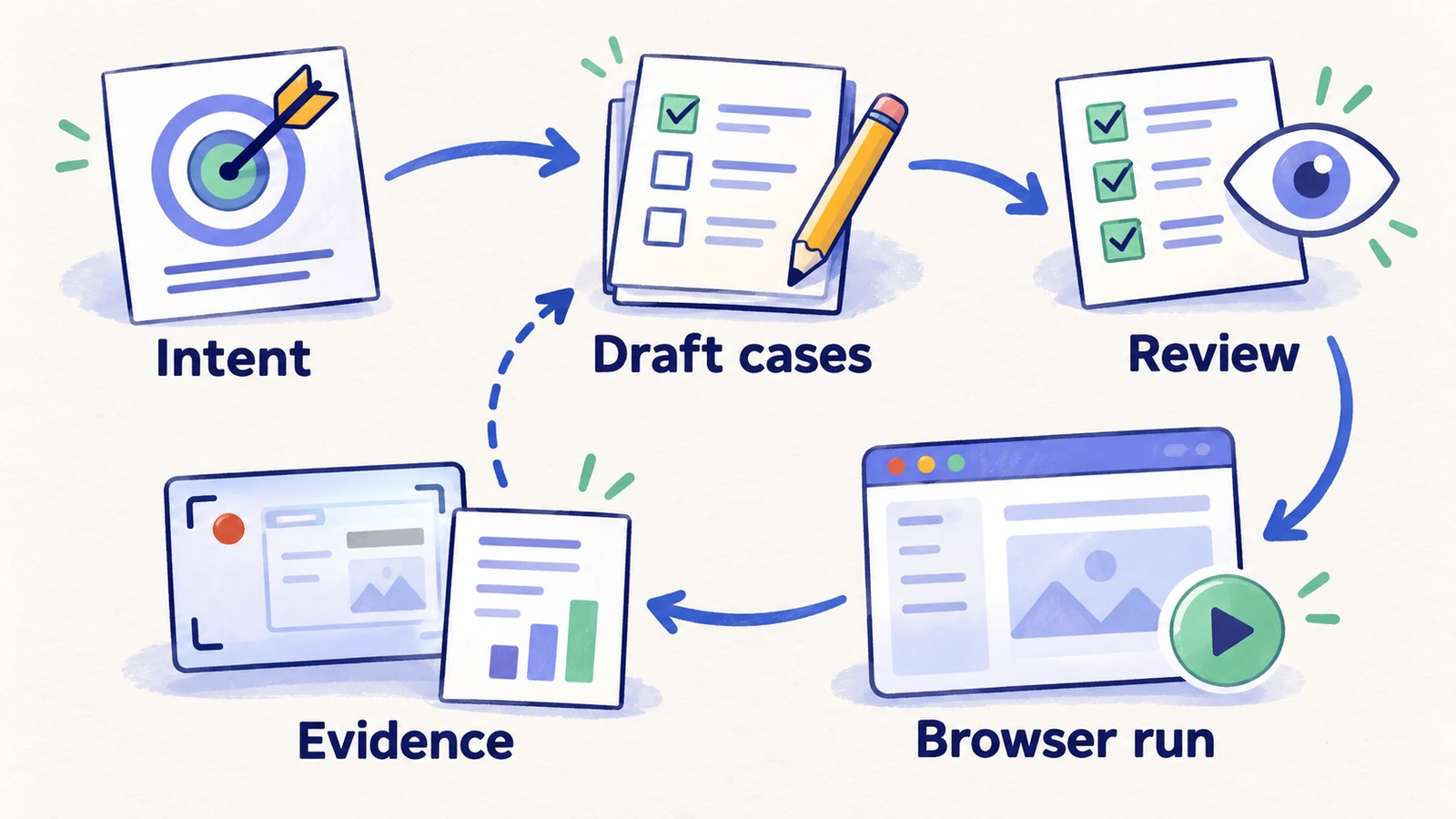
When reviewing a draft, ask:
- Does it protect a specific customer outcome?
- Are the starting account, workspace, and data unambiguous?
- Can the runner observe the expected result?
- Does the case stay within allowed data and billing changes?
- Can a teammate explain a failure from the recorded context?
Remove duplicates and narrow broad exploration goals into repeatable cases. A draft that says “verify the dashboard works” needs more detail before it can support a release decision.
Build the first regression plan in HiTest
Set up the first regression plan in HiTest as follows:
- Create a project with the intended Base URL. Use project setup to keep the environment identifiable.
- Add test accounts for logged-in journeys. Store reusable sign-in context in Test Accounts, rather than embedding secrets in instructions.
- Create the first cases. Use manual creation for known requirements, choosing AI execution for browser-run checks. Use Explore when you need draft cases for a bounded area, then review and select the useful drafts.
- Run and inspect each case. Confirm the selected account, actual actions, expected results, and available evidence. Correct setup problems before scaling the plan.
- Group the accepted cases in a test plan. Start with an explicit subset so that adding unrelated cases does not silently expand a release gate.
- Choose the cadence. Run manually first, then add a schedule or webhook trigger when data and environment setup are repeatable.
Keep inbox access, time-controlled subscription states, and other external setup explicit. A no-code interface does not make unavailable test facilities appear automatically.
Judge the output by its failures
A successful run is useful only when the case could also detect the failure it claims to protect against. In a controlled environment, review how the process responds to a known incorrect state or a safely introduced defect. Keep the acceptance criteria fixed while evaluating that behavior.
The result should distinguish an observed product problem from missing setup or an unavailable dependency. Preserve the account context, deployment, failed action, expected outcome, observed outcome, and screenshots or recordings when available. See what a useful failure report includes.
If the runner navigates around a restriction, changes accounts, or quietly weakens the expectation to finish, the original case has not passed. Review that behavior before trusting the suite.
Maintain requirements as the product changes
No-code cases still need ownership. A renamed control may require no change to the business expectation. A changed subscription policy does. Review the expected results when the product intentionally changes, and update affected accounts and data fixtures with them.
Track whether failures expose product defects, stale setup, ambiguous cases, or execution problems. Also track the effort required to reach a useful conclusion. A growing count of cases is less informative than reliable coverage of important outcomes.
Use the preview deployment guide when the plan should run against changing branch URLs. Verify the completed run separately from the success of a trigger request.
Frequently asked questions
Does no-code regression testing remove the need for engineers?
It can let more team members author and review browser checks. Engineers still help with application testability, reliable fixtures, service-level coverage, integrations, and investigating failures.
Will AI maintain every test automatically?
Do not assume that. Some navigation changes may be handled during execution, but changed requirements, expired accounts, missing data, and unsupported environments still need attention.
What should a team automate first?
Choose a repeated manual journey with a clear customer outcome, stable setup, and a visible pass condition. Verify its execution and failure evidence before adding more cases.