SaaS Subscription Testing: Trials, Upgrades, and Cancellations
SaaS subscription testing should connect what a customer pays for with what the application lets them do. A checkout success page does not prove that premium access was granted. A cancellation confirmation does not prove that access ends on the promised date.
Build the checklist around transitions: trial to paid, one plan to another, payment failure to recovery, and active service to cancellation. For each transition, verify the customer-facing message, effective date, and feature entitlement.
Define the billing policy before testing it
Write down the rules your application promises. Does an upgrade take effect immediately? Does a downgrade wait until renewal? Does a failed payment start a grace period? Can a customer cancel while retaining paid access through the end of the term?
These are requirements to test, not defaults to infer from a billing provider. Keep a small policy table beside the suite:
| Transition | Decision to document | Browser outcome to verify |
|---|---|---|
| Trial ends | Charge, pause, or move to a free plan | The displayed state and available features match the chosen policy |
| Upgrade | Effective date and any price adjustment | The customer sees the intended plan and can use newly entitled features |
| Downgrade | Immediate or next-period change; handling of over-limit data | The scheduled change and access behavior are clear |
| Payment fails | Grace period, retry, and restriction rules | The app explains the state and offers a recovery path |
| Cancel | Immediate end or cancellation at period end | The effective end date and remaining access agree |
Use isolated billing test data. Do not run these mutation cases against a live customer subscription.
Follow the subscription through its states
The diagram below shows one possible product policy: trial, paid access, cancellation scheduled, and ended access. It is a planning aid, not a complete provider state machine. Payment failure behavior branches according to your recovery rules.
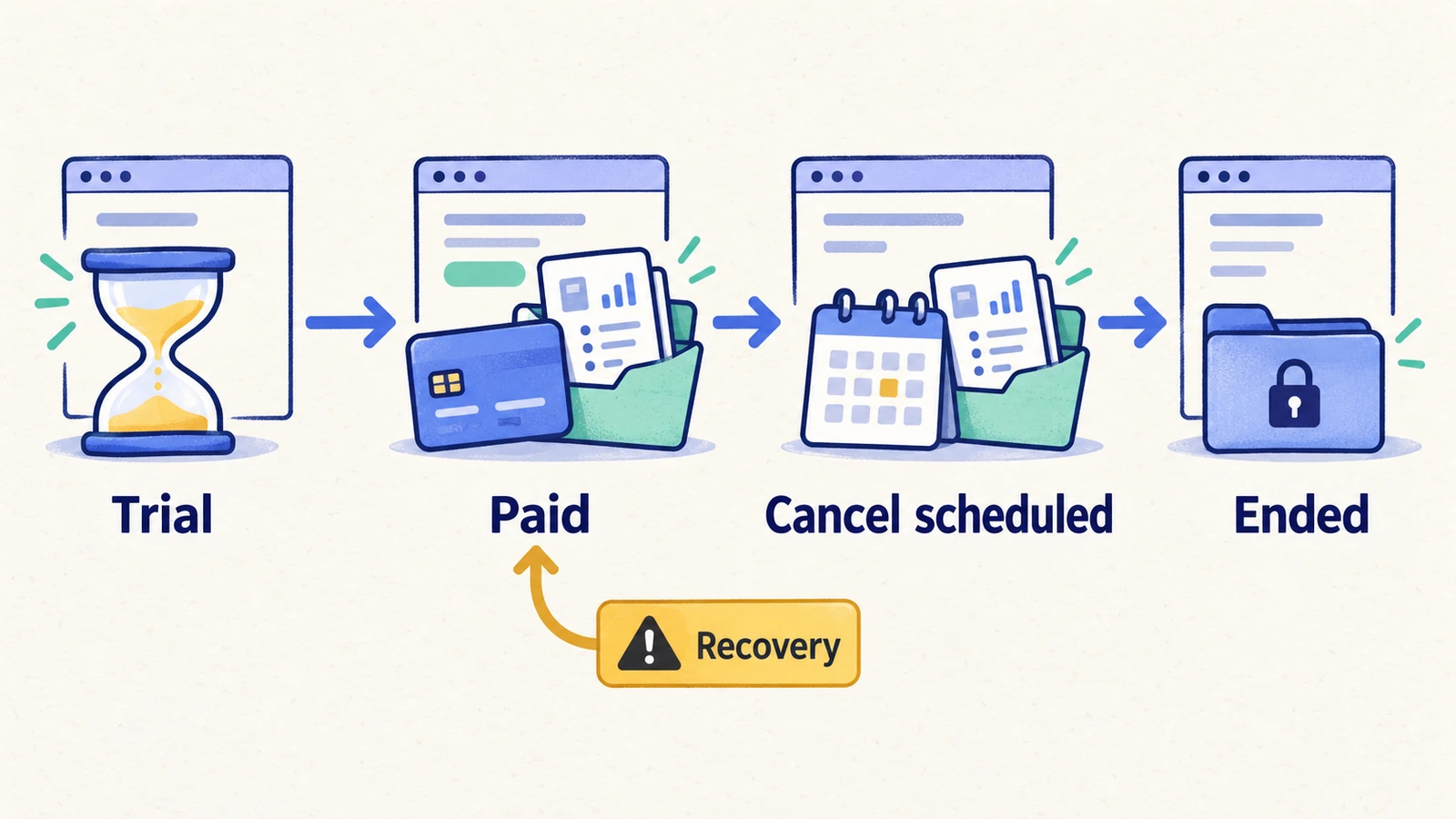
The UI may receive billing updates asynchronously. Define an acceptable confirmation interval and a visible pending state. A case should wait for the expected product condition within that interval rather than sleep for an arbitrary duration and assume success.
The subscription testing checklist
Prepare separate test subscriptions for transitions that would otherwise interfere with one another. Capture their identifiers in private test setup, not in public screenshots or blog examples.
| Case | Action in the test environment | Expected result |
|---|---|---|
| Start trial | Begin the configured trial | Trial dates, plan, and accessible features match the offer |
| Trial conversion | Advance the prepared subscription through trial end | Billing and app access follow the documented conversion rule |
| First paid subscription | Complete sandbox checkout | The correct workspace receives the intended paid plan |
| Checkout abandonment | Leave before completing checkout and return | The app does not claim completed payment or grant unintended access |
| Upgrade | Move to a higher plan | The effective date, displayed amount, and new feature access agree |
| Scheduled downgrade | Select a lower plan | The current and future plans are distinguishable and access follows the schedule |
| Usage above new limit | Downgrade a workspace with data above the lower allowance | The documented restriction or migration behavior occurs without unexplained data loss |
| Failed payment | Use the provider's supported failure scenario | The app shows the configured recovery or restriction state |
| Payment recovery | Resolve the sandbox payment failure | Billing status and product access recover according to policy |
| Cancel at term end | Schedule cancellation | The end date is shown and paid access remains only as promised |
| Undo cancellation | Resume before the configured end date | The cancellation schedule is removed and renewal messaging updates |
| Access after term end | Advance beyond the cancellation boundary | Paid-only actions follow the ended-subscription policy |
| Workspace isolation | Change the subscription of one test workspace | Another workspace's plan and access remain consistent with its own subscription |
| Return visit | Sign out and back in after a completed change | The current plan and entitlements persist |
For Stripe integrations, its official guide describes test environments, payment simulations, and test clocks for billing milestones. Configure those facilities outside the browser case, then check the resulting customer experience. Stripe Billing testing.
Verify feature access, not just the plan badge
Choose one action that distinguishes the old and new plans. If an upgrade adds exports, test an export after the upgrade. If a downgrade removes team management, exercise the corresponding restriction at the effective time. A badge is useful supporting evidence, but the entitled action is the stronger check.
Here is an illustrative upgrade specification:
Preconditions: an authorized billing owner, a disposable workspace on the lower plan, sandbox payment setup, and an agreed immediate-upgrade policy.
- Open billing settings. Expect the workspace and current plan to match the fixture.
- Review the proposed upgrade. Expect the amount, billing interval, and effective time to match the configured offer.
- Complete the supported sandbox payment flow. Expect a confirmed or clearly pending product state.
- Wait for the configured confirmation condition. Expect the higher plan to appear within the documented interval.
- Use the newly entitled feature and reload. Expect the action to succeed and the saved outcome to remain available.
Cover event processing outside the browser
Some billing defects require service-level evidence: duplicate events, delayed processing, out-of-order delivery, and repeated requests. Create integration checks that verify the desired state after those conditions. A browser can then confirm that the resulting entitlement appears correctly to the customer.
Keep provider receipts, internal subscription records, and browser evidence distinct. A provider can report success while the app has not processed it. Conversely, a UI can display an optimistic success message before the final state is known.
Use the original failed run and event context during investigation. Avoid repeatedly changing plans until the UI looks right; that can erase the transition you needed to understand.
Use HiTest for the browser part of the checklist
Use a dedicated billing-owner test account and explicit test case steps. Define allowed sandbox mutations in the case. A generic instruction such as “explore billing” is too broad for plan-changing coverage.
Group stable entitlement checks in a test plan. Keep time advancement and specialized event injection in the provider or integration setup that supports them. HiTest's browser result should describe what the customer could see and do; it should not stand in for unobserved provider state.
For adjacent coverage, see the SaaS regression checklist and role-based access cases.
The upgrade-path testing solution covers the customer-facing plan-change workflow.
Frequently asked questions
Is subscription testing the same as checkout testing?
Checkout covers entering a purchase flow and completing or abandoning it. Subscription testing also covers ongoing transitions, renewal boundaries, cancellation, recovery, and the access those changes grant or remove.
Can browser automation test a renewal months in the future?
Use supported billing test facilities to prepare or advance the lifecycle. Browser automation can verify the resulting product experience. Do not assume changing the browser's clock advances the billing provider.
What should pass after a downgrade?
The result depends on the published policy: effective date, feature restrictions, usage handling, and retained data. Make those expectations explicit before running the case.