Password Reset Test Cases: Links, Expiration, and Recovery
Password reset test cases should prove that a customer can recover access and return to the right account. Opening a reset page is only an intermediate result. The journey finishes when the intended user can sign in with the new password and still reach their existing workspace and data.
Split the checklist into request behavior, link handling, password update, and the return visit. This makes a failure easier to locate than a single case named “forgot password works.”
Prepare a recovery-specific test account
Use a dedicated account whose password can change without breaking other suites. Prepare access to its approved test inbox and document how the account will be restored after execution. Do not use a shared admin login as the target of repeated password resets.
Also prepare a nonexistent test identity and a separate unaffected account. Record the configured link lifetime, resend behavior, password policy, and session policy. If these rules are unknown, resolve them before using the suite as a release gate.
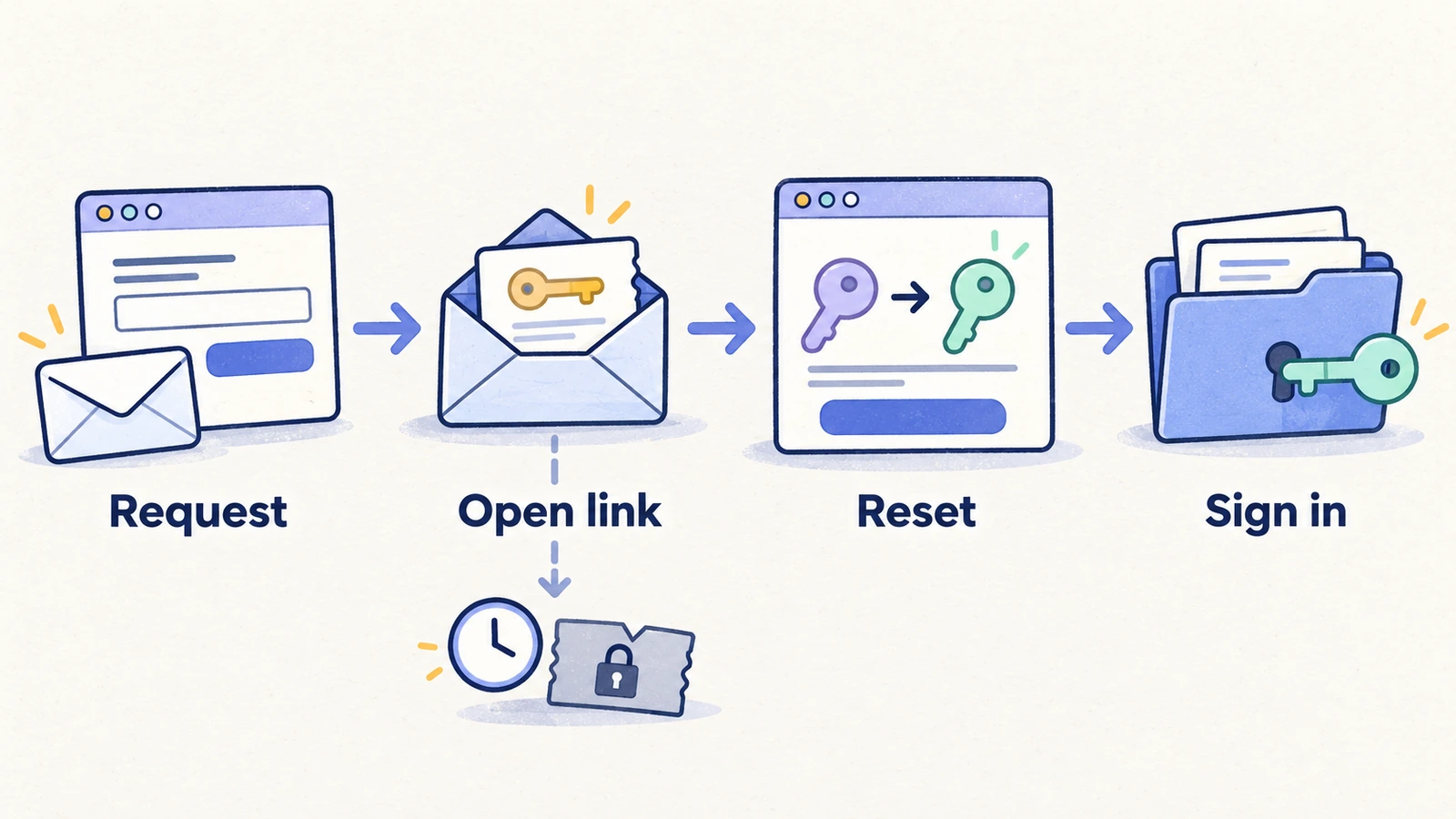
For the security-sensitive checks, OWASP recommends consistent request responses, reset tokens with expiration and single-use behavior, and protection against excessive requests. Its guide also covers password policy and post-reset session handling. Use it alongside your authentication provider's requirements. OWASP Forgot Password Cheat Sheet.
Reset request and delivery test cases
| Case | Action | Expected result |
|---|---|---|
| Existing account | Request recovery for the dedicated account | The request completes with the approved confirmation message |
| Unknown account | Request recovery for a nonexistent identity | The visible response follows the same account-disclosure policy |
| Empty input | Submit without an address | The form explains the missing input and remains usable |
| Malformed input | Submit a clearly invalid address | The input is rejected with a useful message |
| Delivery | Inspect the approved inbox after a valid request | A recovery message arrives for the intended account |
| Wrong environment | Inspect the destination of the delivered test link | The link targets the intended application environment |
| Repeated request | Repeat within a bounded, approved test | The configured abuse protection and resend behavior apply |
| Return to sign-in | Leave recovery through the sign-in route | The user can reach and operate the normal sign-in form |
Message receipt is separate from link validity. Preserve timestamps and delivery context during debugging, but do not copy live reset URLs into public issues or screenshots.
Link and password-update test cases
| Case | Action | Expected result |
|---|---|---|
| Valid link | Open a current link for the dedicated account | The intended password-reset form is available |
| Expired link | Open a link prepared beyond its configured lifetime | The link is rejected and a useful recovery path appears |
| Used link | Reopen a link after a successful reset | It cannot perform a second password reset |
| Invalid link | Open a test URL with an invalid recovery value | The app rejects it without changing account access |
| Latest versus older link | Request another reset and try the earlier link | Behavior matches the documented resend policy |
| Password policy | Enter a value outside the configured policy, then correct it | Invalid input is explained; valid input can proceed |
| Confirmation mismatch | If confirmation is present, enter differing values | Submission is blocked and the form explains the mismatch |
| Reload before save | Reload the reset form before submitting | The product handles the unfinished flow according to its policy |
| Abandonment | Leave before completing the reset | The existing password still behaves as documented |
Expiration is a precondition to prepare, not a reason to make a browser test sit idle for a long time. Use supported test facilities or a separately prepared expired link. Keep detailed token-generation and response-timing checks in security or integration coverage.
Confirm account recovery after the update
The final checks should establish that the change affected the intended account and preserved its product context.
- Complete the reset with a new valid password through the supported flow.
- Open a fresh signed-out session and sign in with that password. Expect the intended identity and workspace.
- Reopen a known record. Expect the existing data to remain available under the same permissions.
- In a separate signed-out attempt, try the old password. Expect it to fail.
- Check any already-open sessions against the documented post-reset policy.
- Confirm that the separate unaffected test account still signs in as expected.
Keep both passwords out of the test report. Record the observed access result for each sign-in attempt.
Treat session revocation as its own expected result. A browser already inside the app may appear signed in until its next protected action. Record what action was attempted after the reset rather than using the appearance of an old tab as the only observation.
Avoid interference with the rest of the suite
A successful password reset changes future login setup. If automation stores the old password, subsequent tests may fail even though recovery worked. Give the reset suite a separate account and a deliberate credential update or restoration process.
Do not run two password-changing cases against that account concurrently. Similarly, allocate distinct links to expiration, reuse, and successful-recovery cases. A previous case can consume or replace a link and invalidate the next case's starting condition.
If email retrieval requires a human, represent that as a manual boundary. A login test using a prepared account does not cover the email recovery path. The coverage record should make both facts clear.
Represent recovery coverage in HiTest
Use manual test case creation to capture approved actions and expected results. Choose an AI-run case only when the necessary environment, account, and recovery flow are available to that browser execution. Otherwise use a manually tracked case for the step requiring human or external setup.
After a reset, update the dedicated test account through the approved credential process before relying on it again. Keep secrets out of steps and failure reports. See authenticated-flow setup for the broader account-management context.
The account-access testing solution connects these checks with sign-in and other recovery workflows.
Frequently asked questions
What is the most important assertion in a password reset test?
The intended user can sign in with the new password and regain the correct account context. Include old-password rejection and the documented session behavior as separate checks.
Should an older reset link still work after a resend?
Use the application's documented policy. Always test expiration and post-use behavior separately from the resend rule.
Can a functional checklist establish recovery security?
No. Functional browser cases check specified user journeys. Token handling, timing, abuse resistance, and server-side enforcement need dedicated security and integration checks.