
Generate test cases
Use Generate test cases when you have a website and want HiTest to propose repeatable checks from its visible workflows. The result is a set of editable drafts. You choose which ones become saved Test Cases.
For a complete first-time walkthrough, follow the Quickstart. To investigate bugs directly, use Find issues.
Before you begin
Create a project with a reachable Base URL. Prepare a Test Account if the workflow requires login, and choose one area to cover first.
Generate and save coverage
Open the generation card
Click AI QA Agent in the project header and choose Generate test cases, or describe the workflow in chat. HiTest opens the setup card for you to confirm.
Define what to explore
Enter Scope, choose an optional Test account, and select a destination under Save to folder if you already have a folder. Configure Proxy only when needed and included in your plan.
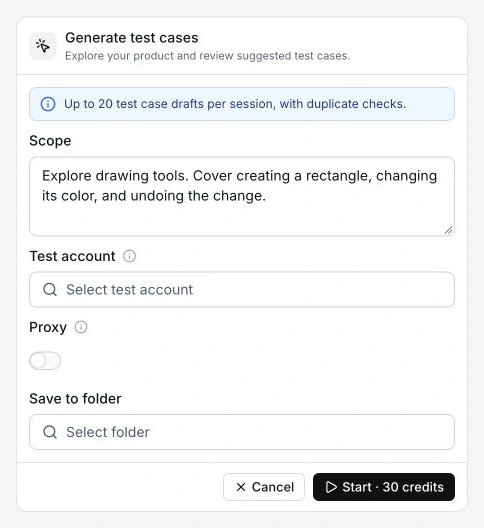
Describe the area, important outcomes, and boundaries. For example:
Explore billing settings for admin workflows.
Focus on invoice access and payment method validation.
Do not change the live subscription.
An explicit request in chat prefills Scope; the text you confirm in the card controls the task. Leaving it empty asks HiTest to explore reachable pages and distinct workflows across the project, within account access and execution limits.
Start browser exploration
Click Start and follow progress in Live View. Without a selected account, HiTest explores the public experience. A login boundary can limit what it reaches.
Review and create the cases
Check each draft's name, precondition, ordered actions, and visible expected results. Confirm the account, priority, status, and folder. Edit unclear instructions, select the useful drafts, and click Create.
Check your progress
The selected cases appear in Test cases with the instructions and account you intended.Verify the saved cases
Run the saved coverage in the background and review its result. Drafts can be based on visible UI and supported behavior; generation does not establish that every proposed step has executed successfully.
Each case should start independently from the Base URL, have the setup it needs, and describe success in terms the browser can observe.
If the result is incomplete
| What happened | What to check |
|---|---|
| No new drafts | Existing coverage is used to reduce duplicates. Check whether the scoped workflows are already covered or were reachable. |
| The agent stopped at login | Select a Test Account with valid credentials and the required access. |
| The task stopped or reached a limit | Review partial drafts and the blocker or incomplete-scope notice before keeping the useful cases. |
| Too broad or unrelated coverage | Narrow Scope to one area and specific outcomes. A new exploration starts a new task. |