
Runs
A Run records a background execution of a saved Test Case or Test Plan. Start it from the product's run controls or from Run test case / Run test plan in HiTest QA Agent. Schedules and deployment webhooks can also start plan Runs.
Start a saved run
- Open AI QA Agent and choose Run test case or Run test plan.
- Select the saved case or plan. For a case, leave Live view off to keep history.
- Click Run, then follow Run created. View to open the saved execution.
- Wait for completion and inspect the individual case results, failed reason, and available recording.
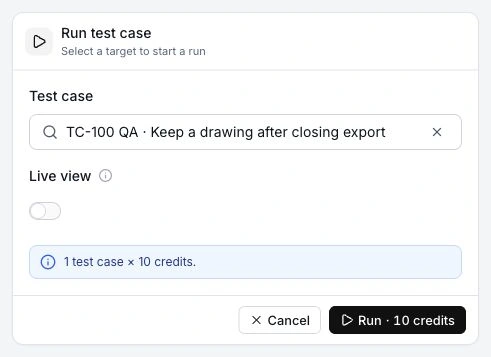
For the complete first-time path, follow the Quickstart. For a failed result, follow Investigate a failed run.
Background and Live View
Background execution creates a Run with individual Test Case execution records. The agent returns Run created. View with a link to the saved result.
A single case can instead run with Live view enabled in the agent card. You see browser progress and a Stop control, and the card displays the result. Live View adds a credit charge and does not create a background Runs history entry or its Issue, recording, and notification workflow. Test Plans do not support Live View.
Status and results
A parent Run is Queued while waiting and Running as its cases execute. Any failed case makes the completed Run Failed. A completed group of Passed or Skipped cases is Passed. The detail view shows case results and counts so you can assess what actually ran.
Plans execute only Active cases. Inactive targets are excluded from case execution records. If all selected targets are Inactive, the current behavior is a Passed Run with zero case executions and a minimum Run charge of 10 credits. A plan with no matching cases, or whose only Active cases have no steps, cannot create a normal Run. Do not treat a zero-execution Passed result as verified coverage.
Directly running a saved case can execute it even when it is Inactive. Status controls inclusion in plans.
Review and rerun
Use Runs to filter by status or trigger, refresh results, open case-level evidence, rerun, or delete history. Results can finish before recording processing does.
Rerun creates a new Run and consumes credits again. A plan rerun resolves its current targets and case settings. A standalone rerun uses the original linked case's current configuration. It is not a replay of an immutable past configuration.
History
Run history is retained for 7 days on Free, 30 days on Starter, and 3 calendar months on Team. Cleanup uses the workspace's current plan and skips active Runs. Expired Runs and their case executions are removed from available history by the daily cleanup task, which also attempts to delete their private Run recordings. Issues and credit usage are retained independently.
Delete selected Runs when that history is no longer useful. Deleting records does not restore spent credits. See credits and plans for shared concurrency and allowances.