Test Cases for Search, Filters, and Pagination
Useful test cases for search, filters, and pagination check how the controls work together. A search box can find the right record on page one while dropping its filter on page two. Changing a query from a later page can also produce an apparently empty list because the old page number was retained.
Use a known dataset and write down the expected result set before opening the browser. Without that reference, “results look right” is difficult to review and easy to accept incorrectly.
Build a small dataset with predictable answers
Imagine a project list with a name search, a status filter, a name sort, and a page size of two. Seed these six disposable records in the test workspace:
| Name | Status |
|---|---|
| Cedar Alpha | Active |
| Cedar Beta | Archived |
| Cedar Delta | Active |
| Cedar Gamma | Active |
| Maple Alpha | Active |
| Willow Alpha | Archived |
For a name query of Cedar, an Active filter, and ascending name sort, the expected results are Cedar Alpha, Cedar Delta, and Cedar Gamma. Page one contains the first two; page two contains Cedar Gamma. The total matching count is three if the product displays such a count.
Those expectations are specific to this illustrative fixture and its agreed name-search behavior. Substitute your application's matching rules, collation, and page size. If page size is fixed, seed enough records to span at least two pages.
Understand the combined result
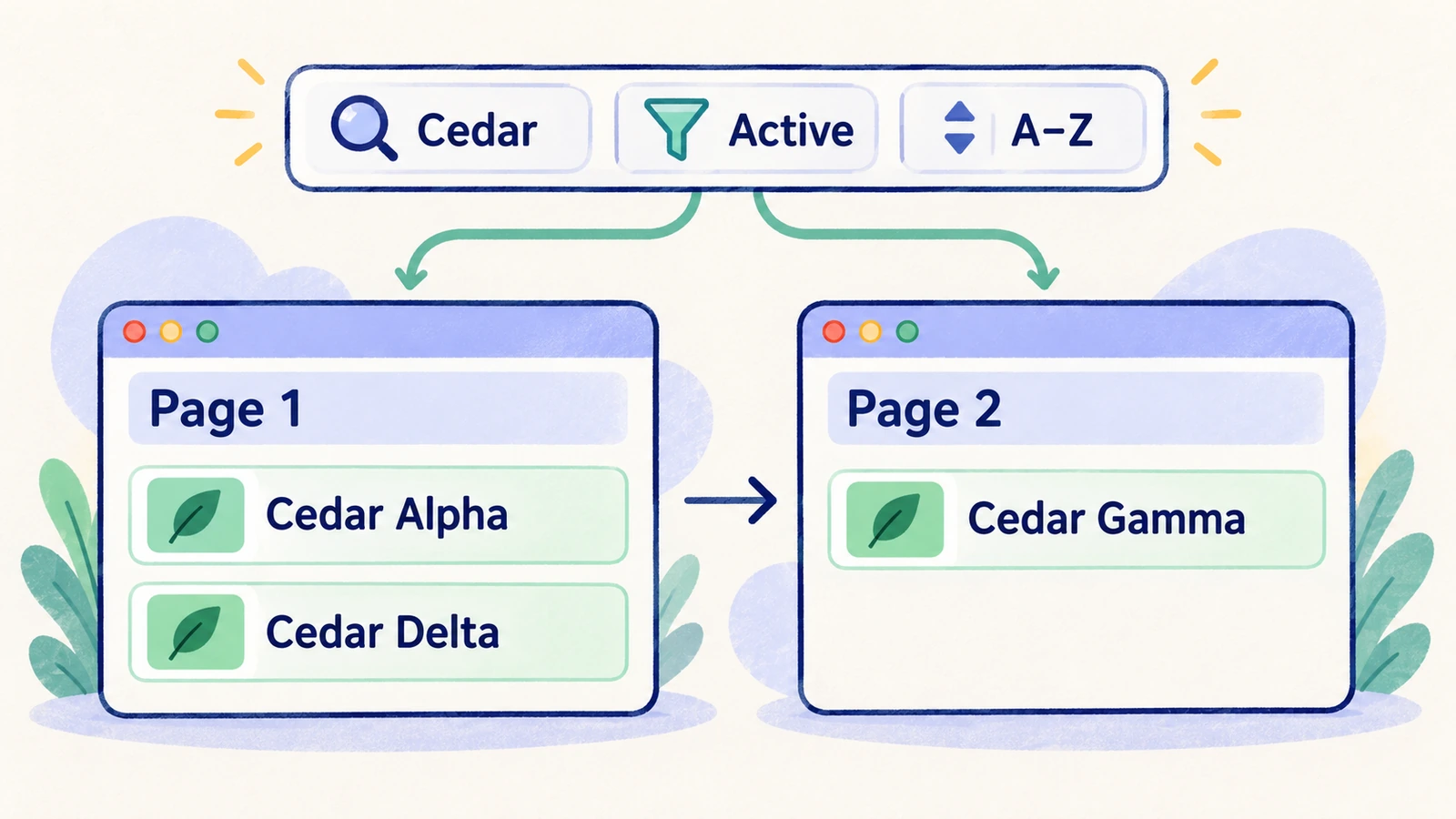
Think of query and filters as defining membership in the result set, sort as defining order, and pagination as selecting a slice. This is a test model, not a requirement about the order of operations inside your implementation.
Search and filter test cases
| Case | Action | Expected result for the agreed fixture |
|---|---|---|
| Query match | Search for Cedar with no status filter | The four Cedar records are the complete matching set |
| Exact known record | Search for a distinctive full name | The intended record is present according to the matching rule |
| No match | Enter a query absent from the fixture | A clear no-results state appears without stale rows |
| Clear query | Remove the query | The list follows the remaining filters rather than retaining old query results |
| Filter only | Select Active without a query | Only the four active records match |
| Query plus filter | Search Cedar and select Active | Only Cedar Alpha, Cedar Delta, and Cedar Gamma match |
| Change filter | Change Active to Archived while searching Cedar | The matching set becomes Cedar Beta |
| Clear filters | Remove the status constraint | The active query remains applied if controls are independent by design |
| Supported characters | Search a separately seeded name with punctuation or Unicode | Matching follows the documented rule and the UI remains usable |
| Query normalization | Try case or surrounding-space variations | Results match the application's chosen normalization behavior |
Include an empty-workspace check separately from a no-results check. A workspace with no records may show an onboarding action; an existing dataset with no matches should help the user adjust their search.
Pagination and sorting test cases
| Case | Action | Expected result |
|---|---|---|
| Next page | Use Cedar, Active, ascending sort, and page size two; open page two | Cedar Gamma appears and the query and filter remain active |
| Previous page | Return to page one | Cedar Alpha and Cedar Delta reappear in the agreed order |
| Last page | Navigate to the final matching page | No further valid page is offered or loaded beyond the result boundary |
| Narrow query on later page | From page two, search Cedar Alpha | The page resets or clamps according to policy and shows the valid result |
| Reverse sort | Change ascending to descending name order | The complete matching set remains the same and the visible slice changes correctly |
| Page-size change | If supported, change the size while on a later page | Navigation and visible rows follow the documented reset or position rule |
| Browser back | Change query or page, then navigate back | State restoration matches the product's navigation contract |
| Reload | Reload a filtered list | Query, filters, sort, and page follow the documented persistence policy |
| Shared URL | If URL state is supported, open the list URL in another session | Supported state is restored, subject to the second account's access |
| Delete last row | Remove the only row on the final page using disposable data | The list moves or refreshes coherently instead of leaving an unexplained invalid page |
URL persistence is a product capability to test when offered, not a universal prerequisite for every list. Likewise, do not write a test that assumes arbitrary page-number access when the interface uses cursors or a load-more button.
Watch for stale results during rapid changes
In a controlled test environment, change a query while a previous request is still pending. The final visible result should correspond to the current controls, even if responses arrive in a different order. Check the displayed rows and loading state after the interface settles.
This is best paired with a component or integration test that can control response timing. A browser case alone may not reliably reproduce the race. Record whether the condition was actually exercised rather than claiming coverage from a normal fast run.
For large lists, verify ordering around page boundaries with stable fixture data. If records can have equal sort values, define the product's tie behavior before asserting an exact order. Concurrent changes can otherwise make a reasonable result look like a defect.
Write a browser case with exact expectations
A useful case for the example dataset is: open projects, query Cedar, select Active, sort ascending, verify Cedar Alpha and Cedar Delta, move to page two, and verify Cedar Gamma. Assert that Cedar Beta is absent from the matching results and that the Active control remains selected.
Represent that specification in HiTest as separate actions and expected results, using a test account scoped to the seeded workspace. Keep fixture creation and cleanup explicit.
Add the most important combined-state case to the release smoke group only if list behavior is essential to the product. Keep the wider matrix in the regression plan.
Frequently asked questions
Should search, filters, and pagination be tested separately?
Test each control's basic behavior and add combined-state cases. The interaction cases catch dropped filters, stale page positions, and inconsistent ordering that isolated checks miss.
How much test data is enough?
Prepare enough known records to create matches, nonmatches, at least two pages, and a partial final page. Add duplicate sort values or special-character names when those behaviors matter.
What should happen when a filter leaves the current page empty?
Define whether the application resets, clamps, or otherwise navigates to a valid result position. Then test that rule explicitly and distinguish it from a genuine no-results state.