State Transition Testing: Check What Happens Between Statuses
 By Xusheng Yang
Your task page can display Queued, Running, Succeeded, Failed, and Canceled. Each badge looks correct in isolation. Yet a canceled task can suddenly become Succeeded when a late worker response arrives.
State transition testing examines how a system moves between states in response to events. It gives you a way to test ordering, permissions, and invalid actions that a collection of screenshots cannot establish.
This is part 4 of Testing Methods in Practice. The export-job lifecycle here is a fictional contract for a worked example.
Define a small model with explicit rules
Our export job starts Queued. A worker can move it to Running. A running job can succeed or fail. A user can cancel a queued or running job. Succeeded, Failed, and Canceled are terminal states for that job identifier.
Retry creates a new job linked to the old one. It does not reopen a terminal job. Cancellation is assumed to take effect when the server accepts it; if completion commits first, cancellation must report that the job is already finished.
Those are product decisions. Some systems have a Canceling state or allow retries under the same identifier. Draw the lifecycle your product actually promises rather than copying this one unchanged.
List transitions as starting state, event, and outcome
| Starting state | Event | Expected next state or result |
|---|---|---|
| Queued | Worker starts | Running |
| Queued | Server accepts cancellation | Canceled; worker must not publish a result |
| Running | Result commits | Succeeded; result is associated with this job |
| Running | Processing fails | Failed; actionable failure information is retained |
| Running | Server accepts cancellation | Canceled; later completion cannot replace it |
| Failed | User retries | Old job remains Failed; a new Queued job is created |
| Succeeded | User attempts cancellation | Reject cancellation; original result stays available |
| Canceled | Late worker completion | Remain Canceled; no successful result is published |
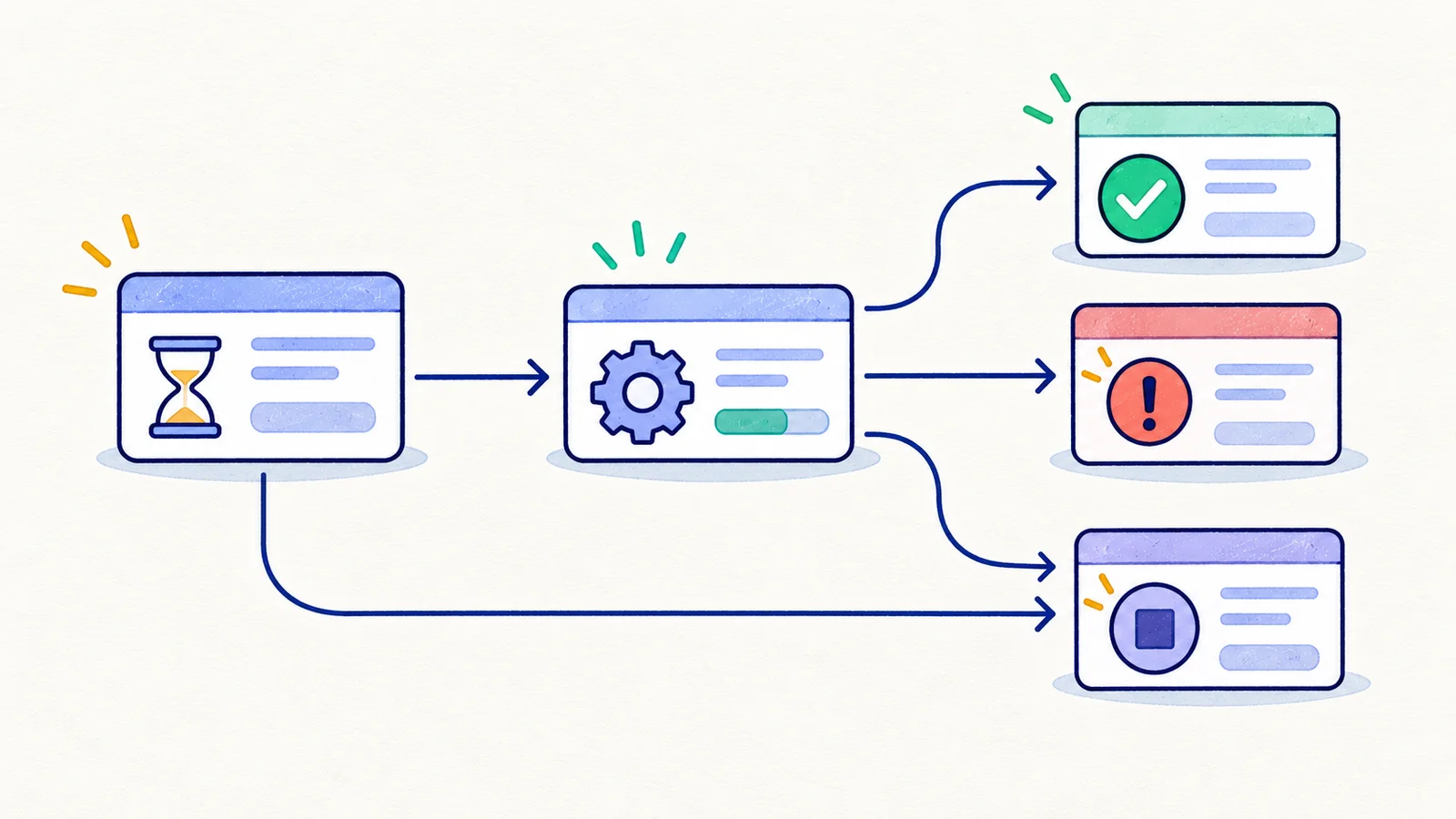
Include guards such as authorization and available quota. “Start” may be a valid event in Queued but still be rejected when the requesting worker does not own the lease. A state diagram without its guards leaves important behavior unspecified.
Test transitions and journeys separately
First test each allowed transition from a prepared state. Then test a few complete journeys: success, processing failure followed by retry, cancellation before start, and cancellation while running.
Cover forbidden transitions too. Attempting Running directly from Succeeded should fail even if the UI offers no such button. Exercise that rule through a controlled integration test; do not rely on the browser to fabricate internal worker events.
State transition techniques appear in ISTQB's Foundation Level framework. For this workflow, maintain a simple coverage record: each allowed transition, each prohibited transition you selected, and the sequence cases that connect them.
Make race outcomes observable
Cancellation and completion can overlap. Introduce a test-only barrier before the result commit, request cancellation, wait for its accepted response, then release the worker. Verify the persisted terminal state and the absence of a published export.
Reverse the order in another case: let completion commit, then cancel. That should preserve Succeeded and return the documented completed-job response. If your system uses another conflict policy, define both outcomes before running the experiment.
A pair of fast clicks does not prove either ordering occurred. Save event timestamps, job identity, and server-side transition evidence. The concurrency guide explains how to coordinate overlapping operations.
Check what the user sees after the transition
For a browser acceptance case, open the job detail page and cancel a running export. Under this example's contract, the page must show Canceled after confirmation, stop presenting the job as active, and offer the appropriate next action.
Reload and reopen the job in another session. The state should agree. If the UI polls, allow the documented observation delay, but do not accept a permanent mismatch. A toast saying “cancellation requested” is not the same evidence as a terminal Canceled state.
Job state and page state have different responsibilities. A correct backend can still have a stale polling view, while a correctly updated badge can conceal an incorrect persisted state. Check both where the claim requires them.
Keep the model useful as the feature grows
When a Paused state is introduced, review incoming transitions, outgoing transitions, guards, and old terminal assumptions. Adding one badge can affect cancellation, retry, billing, and notifications.
Your exercise: model one asynchronous feature with fewer than eight states. For every terminal state, write one event that must not change it. Then choose a single browser journey that demonstrates the user can understand and recover from an unsuccessful outcome.
Next in the series: Pairwise testing.