From Clicking to Understanding Change: The Value of Visual AI QA
Imagine a test that clicks Create project, finds the new project's name in the page, and passes.
The user might still be stuck. A loading overlay could cover the result. A dialog could block the next action. The success message could blend into its background so completely that nobody can read it.
The click happened. The expected text exists. Yet the experience is broken.
For QA, completing an action is only part of the job. We also need to understand what changed and whether that change lets the user continue. Visual AI QA brings the rendered page into that judgment.
What visual observation adds to DOM testing
The DOM describes the page's structure, including its elements, text, and attributes. Browser automation can use that structure to locate controls, enter values, and check application state.
It would be inaccurate to say that DOM automation only executes while visual agents observe. DOM-based tests can observe changes, wait for conditions, and make precise assertions. Playwright, for example, checks visibility, stability, whether a target receives events, and whether it is enabled before a normal click. Playwright actionability documentation.
Visual observation adds another source of evidence: the page as it actually appears in the browser. That evidence includes the spatial relationship between a dialog and a button, the readability of a message, and the appearance of an unexpected screen.
The advantage comes from using that evidence to guide the test. A screenshot saved at the end of a run helps someone investigate. A screenshot interpreted at a meaningful decision point can help the agent decide what to do next.
Observe the result before choosing the next action
Consider the same project creation flow. The agent fills out the form and clicks Create. Several things could happen: the form closes and the project appears, an inline error asks for a different name, a confirmation dialog opens, or the application keeps loading.
Each state calls for a different next step.
A visual agent can inspect a fresh screenshot after submission, identify the current state, and respond to the evidence. If the page is still loading, it can wait and look again. If the form shows a validation error, it can check that error against the test's expected result. If the project appears, it can verify the visible result before continuing.
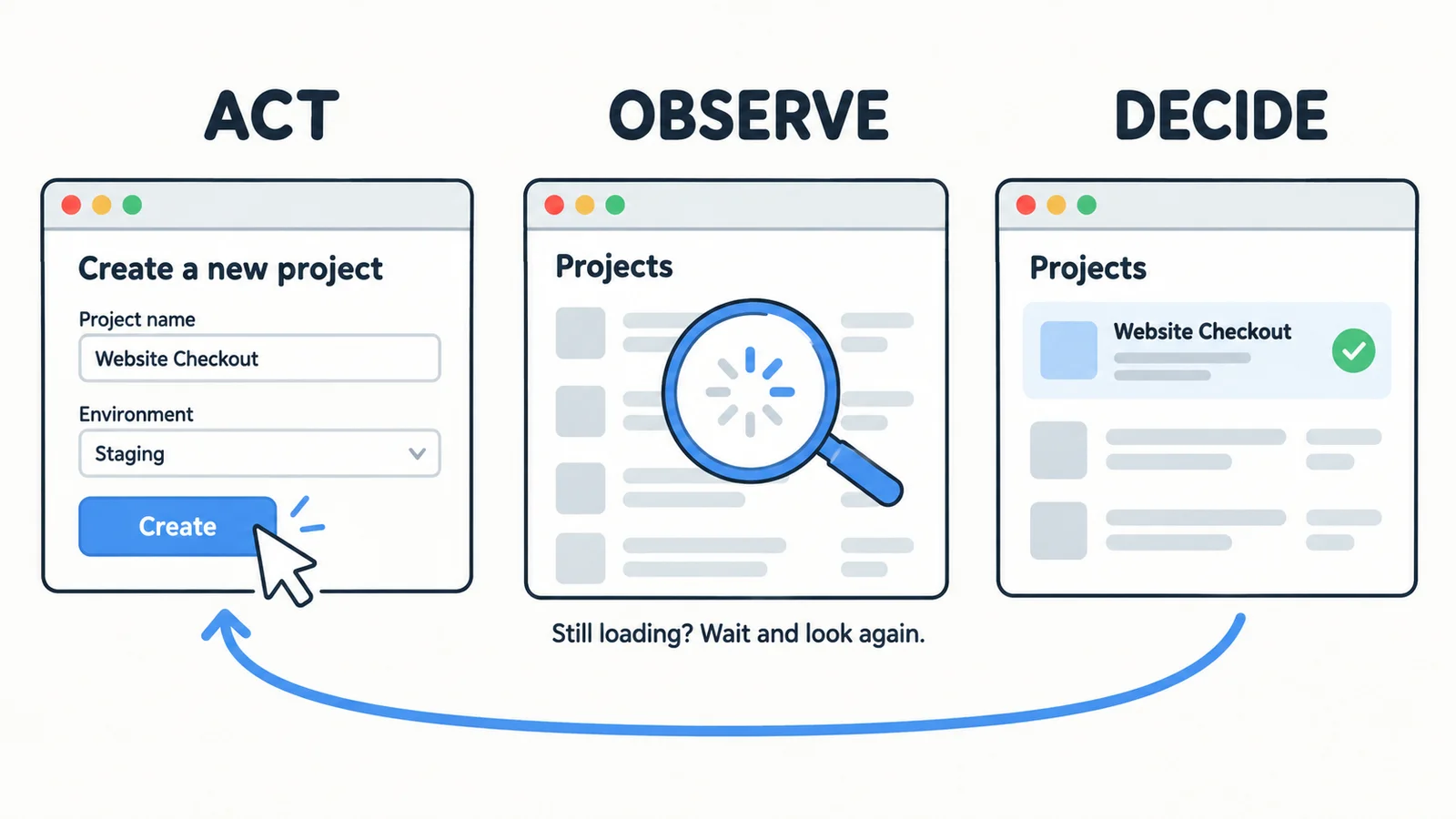
The cycle is straightforward: observe the current page, act, inspect the result, and choose the next step.
This does not require a screenshot after every keystroke. Predictable actions can be grouped together. The useful observation points are where an action may change the page, reveal a new control, or produce a result that needs verification.
DOM-based agents can also follow a feedback loop. Visual input expands the evidence available within that loop to include how the whole interface is presented.
Unexpected interruptions need a fresh understanding of the page
Real browser journeys do not always follow the expected sequence.
A login attempt might lead to a temporary human verification screen. A session might expire. A confirmation dialog might appear only for certain accounts. Continuing with the original sequence without checking the page can lead to repeated clicks and an unhelpful timeout.
Visual observation gives an agent a way to recognize that the current screen differs from the expected next state. For a verification screen, the appropriate response might be to wait for an automatic check to finish, follow a supported visible instruction, or record that the journey remains blocked and needs human attention.
Recognizing a verification screen does not guarantee that the agent can complete it. The useful capability is identifying the interruption and choosing a response that fits the current page.
Recovery also needs to preserve the test's purpose. If the test requires a particular account or input, the agent should keep that requirement. Changing accounts or selecting a different option just to reach a success screen would weaken the test.
An element can exist without being useful to a user
Suppose a success message contains exactly the expected text, but a CSS regression makes it fully transparent. An assertion that only checks whether the text exists could pass.
Even a framework's visibility check has a specific technical meaning. Playwright documents that an element with opacity: 0 is still considered visible under its visibility definition. That makes it a useful example of why a visibility assertion and human perception can differ. Playwright visibility definition.
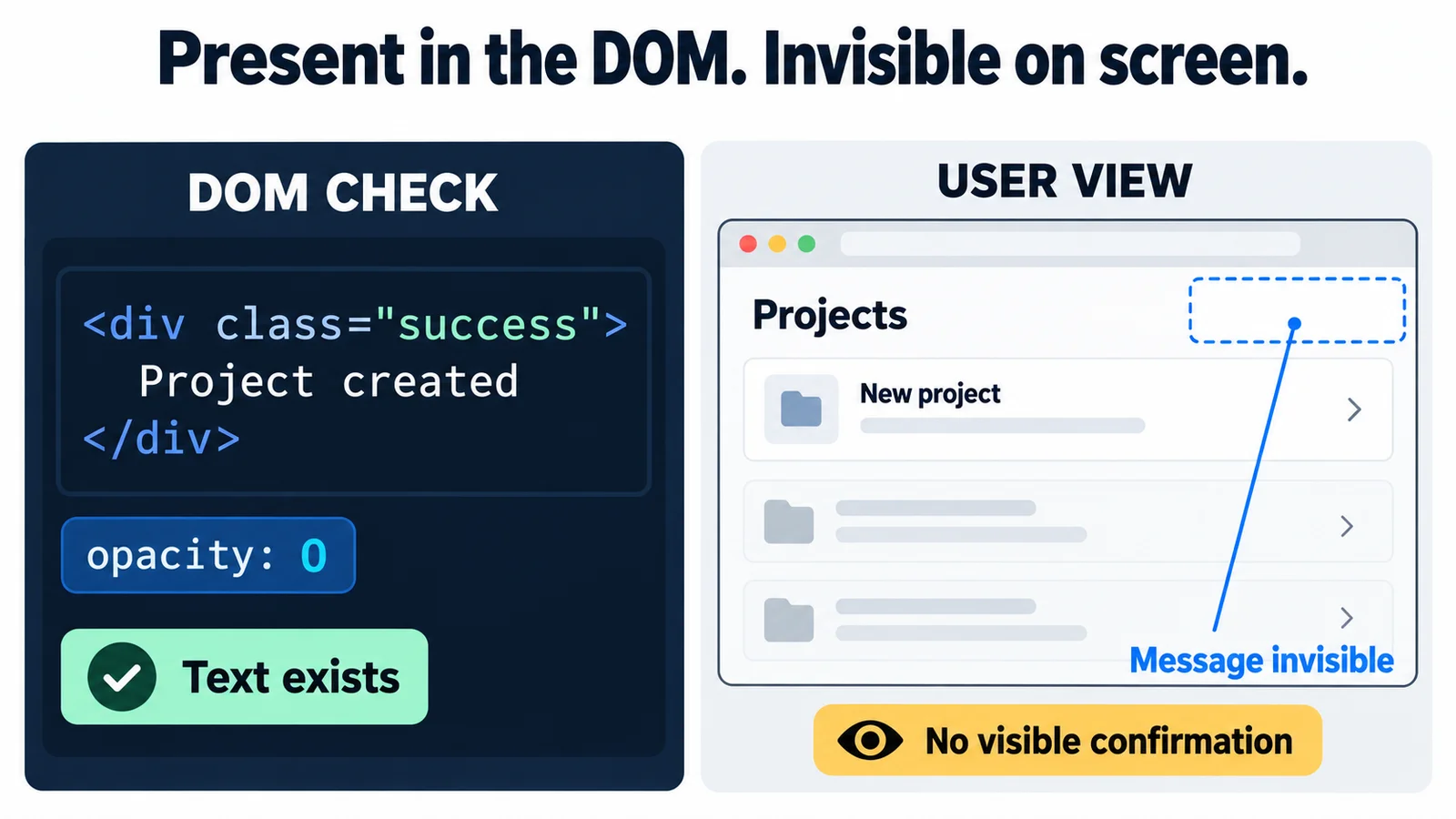
Other examples include clipped labels, overlapping content on mobile, and text with too little contrast against its background. A DOM test can check many of these conditions when the right assertions are written. Visual observation makes the rendered appearance directly available to the agent as it evaluates the journey.
That creates an opportunity to detect problems beyond a missing element. It does not guarantee that a model will notice every visual defect. Detection still depends on the model, screenshot quality, viewport, observation timing, and how clearly the test describes the expected behavior.
Seeing a result still requires clear acceptance criteria
A success toast is evidence that the interface displayed a success toast. It does not establish that the project was saved correctly.
If the requirement says the new project must remain available after a reload, the agent needs to reload and verify that result. If the requirement says a user cannot access another workspace's project, reaching a normal-looking page is insufficient evidence.
Visual QA works best when the test makes the expected outcome explicit. For project creation, that might mean the dialog closes, the project appears in the correct workspace, and the project remains available after reloading.
Those criteria give the agent something concrete to verify. They also make a failure report more useful: the report can connect the attempted action, the expected outcome, and the page that actually appeared.
Build QA around the experience users can complete
DOM inspection remains valuable for exact text, attributes, and structured data. Existing browser tools can also combine DOM assertions with screenshot comparisons; Playwright supports comparisons against reference screenshots. Playwright visual comparisons.
The case for visual AI QA is that rendered appearance deserves an active role in browser testing. It can inform both the next action and the judgment about whether the result is correct.
In HiTest, the browser agent uses screenshots to observe the page and verify visible outcomes during execution. That makes the connection between an action and its on-screen result part of the testing workflow.
A useful place to evaluate this approach is one important journey in your own product. Look at what happens after submission, when an unexpected dialog appears, and when the expected text exists but is hard to see. Check whether the agent notices, whether it preserves the original requirement, and whether its report gives you enough evidence to understand the outcome.
The standard is whether a user can complete the task and recognize that it worked. Every click in the test should help establish that.